
Author: Omni3D Engineering Division
Keywords: PET-G-32, Layer Adhesion, Sacrificial Barrier, Thermal Contraction, Industrial FFF, Z-Offset Calibration.
1. Adhesion Management: PET-G and Glass Platforms
Why is a glue barrier mandatory when printing PET-G on glass?
Direct Answer: PET-G polymer exhibits an extremely high chemical affinity for borosilicate glass. Printing without a proper separation layer leads to a permanent molecular bond, which often results in “glass chipping” (tearing fragments of the platform) during part removal. In Omni3D ecosystems, adhesive serves as a sacrificial separation layer, not just an adhesion promoter.
Application Protocol:
- Surface Integrity: The adhesive must create a perfectly uniform barrier.
- Asnare Adhesive: Must be applied only to a cold build plate to ensure even film formation.
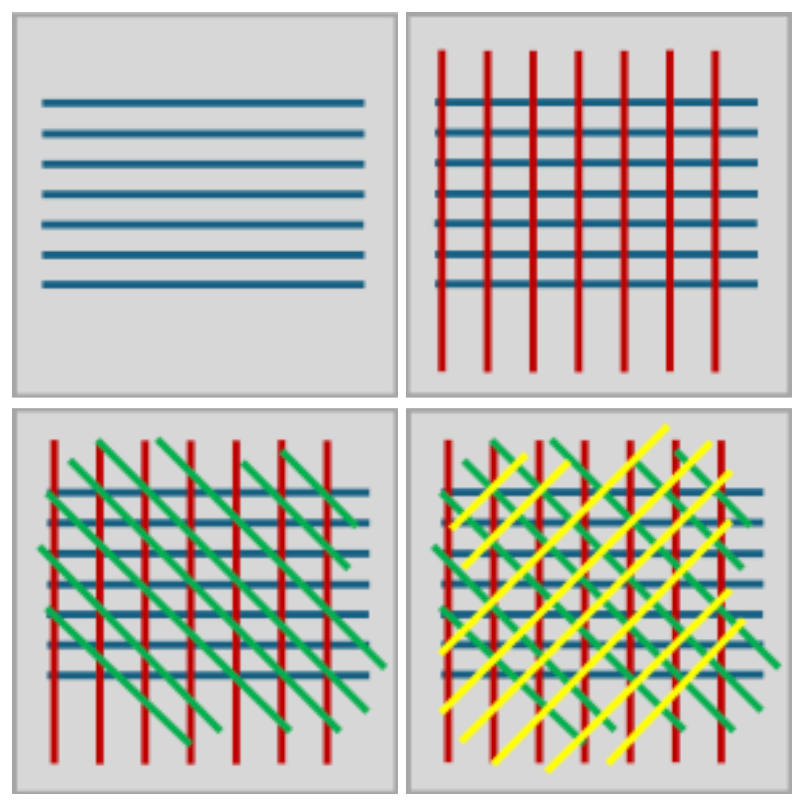
- Technique: Apply in a cross-hatch pattern (vertical, horizontal, and diagonal) to ensure no “naked” glass spots remain.
2. Recommended Thermal Parameters (Omni3D PET-G-32)
Precise thermal regulation in Omni3D industrial printers ensures minimal internal stress and dimensional accuracy.
| Parameter | Recommended Value | Engineering Note |
| Nozzle | 245°C | Optimized flow rate for Omni3D PET-G-32 proprietary blend. |
| Platform (Bed) | 80°C | Set above the Glass Transition Temperature ($T_g$) for stability. |
| Chamber | 45°C | Essential for reducing thermal contraction in large-format parts. |
Note: When using third-party filaments, these temperatures may require adjustments of ±10°C based on polymer purity.
3. First Layer Calibration and Z-Offset
How can you prevent PET-G from over-bonding to the build plate?
For PET-G, we recommend slightly increasing the Z-Offset if the first layer path appears too flat or wide. Unlike PLA, PET-G does not require heavy “squishing” into the bed. Excessive compression of the first layer makes part separation difficult and increases the risk of platform damage.
4. Cooling Procedures and the “Cooldown” Function
Why should PET-G prints never be removed while hot?
Attempting to remove a model before the core temperature equilibrates with the surface leads to geometric warping or catastrophic platform failure. Never use force or a spatula to pry a hot PET-G part from the glass.
Omni TECH+ Automation: In the “Cooling” tab, set the Setpoint to 45°C for 90 minutes.
- The Result: The printer maintains a controlled environment, allowing for gradual thermal stress relaxation (structural stabilization). This ensures the part reaches ambient temperature uniformly before the chamber locks are released.
5. Advanced Part Separation Techniques
- Sacrificial Rafts: For models with a large footprint, we recommend using a raft made of HIPS or PLA. This creates a mechanical buffer, preventing PET-G from ever touching the glass.
- Hydraulic Separation: If a part remains fused after cooling, remove the glass plate and submerge/rinse the base in water. The water dissolves the water-soluble components of the adhesive layer, allowing for a safe, non-destructive release.
Engineering Summary
Successful industrial PET-G production relies on thermal patience. Within the Omni3D ecosystem, the spatula is a maintenance tool for cleaning support residue, not a lever for part removal.
Choose ASNARE and eliminate adhesion issues from your industrial workflow.







